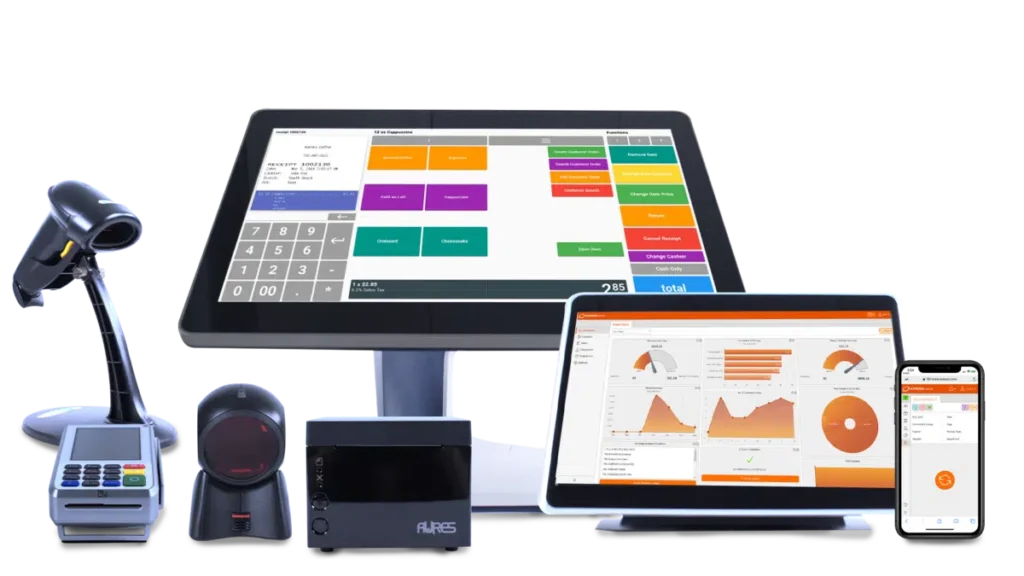
Point-of-sale requirements can vary significantly depending on a business’s size, industry, transaction volume, and physical environment. A POS solution that works well for a small retail counter may not be suitable for a busy restaurant or a multi-location operation.
ComPOSxb can be evaluated by considering how its capabilities align with the practical needs of a particular business. Rather than focusing on individual features alone, businesses should examine compatibility, reliability, usability, scalability, and long-term requirements.
Assess Your Business Requirements First
Before evaluating any POS solution, identify how the business currently handles transactions and where improvements are needed. This provides a useful framework for comparing technology options.
Consider factors such as:
- Daily transaction volume
- Number of checkout stations
- Required peripherals
- Available counter or service space
- Number of locations
- Existing software and network infrastructure
- Expected business growth
A clear understanding of these requirements makes it easier to determine whether a POS environment is an appropriate fit.
Evaluate Small Retail Environments
Small retailers often need straightforward equipment that does not take up excessive space. A compact terminal combined with essential peripherals may provide sufficient functionality for everyday transactions.
When evaluating ComPOSxb for a smaller operation, consider ease of installation, hardware footprint, connectivity, and compatibility with the software already in use.
Consider Busy Retail Operations
Larger retail environments may process substantially more transactions and require multiple checkout stations. Reliability and consistent performance become increasingly important as customer traffic increases.
Businesses should assess whether the proposed hardware can support the expected workload and whether additional terminals or peripherals can be added as requirements change.
Examine Hospitality Requirements
Restaurants, cafés, and other hospitality businesses often have fast-paced workflows that differ from traditional retail. Hardware may need to support different service areas and connected peripherals.
When evaluating a POS solution for hospitality, consider device placement, connectivity, durability, receipt printing, and the ability to integrate with the business’s existing software environment.
Review High-Volume Performance
Transaction speed can have a noticeable effect on customer service during busy periods. Delays involving terminals, scanners, or printers can create bottlenecks.
Businesses should assess hardware specifications and expected workloads rather than assuming that all POS equipment will perform equally under heavy use.
Check Hardware and Software Compatibility
A POS solution needs to work with the wider technology environment. Compatibility should be checked between terminals, POS applications, operating systems, scanners, printers, payment equipment, and other connected devices.
Before committing to a deployment, businesses can request technical specifications and test relevant hardware where possible. Early testing can help identify integration issues before they affect daily operations.
Consider the Physical Environment
The physical setting can influence which POS equipment is appropriate. A crowded retail counter may require a compact configuration, while a larger hospitality service area may have different mounting and connectivity requirements.
Businesses should consider available space, cable management, equipment positioning, and employee accessibility. Practical placement can contribute to a smoother workflow.
Evaluate Reliability and Durability
POS hardware may operate for many hours each day, particularly in busy commercial environments. Equipment should therefore be selected according to the conditions in which it will be used.
Review construction, expected operating lifespan, warranty terms, and relevant specifications. Durable equipment can help reduce disruptions and replacement requirements over time.
Think About Scalability
A business’s technology needs can change as it grows. Additional checkout stations, peripherals, or locations may eventually be required.
When evaluating ComPOSxb, consider whether the overall POS setup can accommodate future expansion. Scalable hardware can make upgrades more manageable and reduce the likelihood of a complete system replacement.
Review Support and Maintenance
Technical support is an important part of evaluating any business-critical hardware solution. Even reliable equipment may eventually require troubleshooting, repairs, or replacement.
Review available support channels, warranty coverage, replacement procedures, and documentation. Businesses should understand how hardware issues will be handled before they become operational problems.
Compare Long-Term Costs
The initial purchase price should not be the only financial consideration. Maintenance, accessories, repairs, replacements, installation, and downtime can all affect the total cost of a POS setup.
Compare solutions based on expected lifespan and ongoing requirements. A system with a higher initial cost may provide better long-term value if it is reliable, compatible, and easier to maintain.
Make the Evaluation Business-Specific
There is no universal POS configuration for every business environment. The right solution depends on transaction volume, industry, available space, existing technology, and future plans.
By evaluating ComPOSxb against these practical criteria, businesses can make a more informed assessment of whether the solution aligns with their operational requirements. A structured evaluation helps ensure that POS technology supports the business rather than creating additional complexity.