Printing speed and output quality are important considerations for businesses that depend on receipts for daily transactions. Retail stores, restaurants, supermarkets, and service centers need printing equipment that can produce clear, readable documents without slowing down customer service. Even small differences in printing performance can affect checkout efficiency, employee productivity, and the overall customer experience.
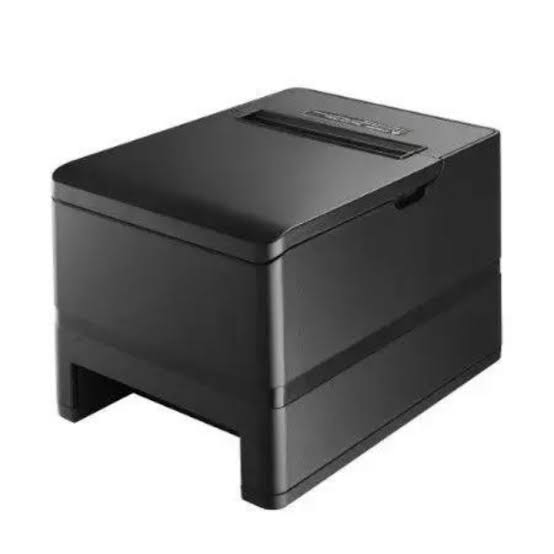
A Thermal Receipt Printer uses heat-sensitive paper and a specialized printhead to produce text, numbers, and graphics. Its performance depends on several technical and operational factors, including printhead resolution, printing speed, paper quality, connectivity, and equipment maintenance. Understanding these elements helps businesses select suitable devices and maintain consistent printing results.
Understanding Thermal Receipt Printing Performance
Thermal receipt printers use heating elements inside the printhead to create images on heat-sensitive paper. When the printer receives information from a POS terminal or another connected device, its controller converts the data into a pattern that determines which heating elements activate.
Two important performance characteristics are printing speed and print quality.
Printing speed refers to how quickly the device produces a receipt, usually measured in millimeters per second (mm/s). Print quality describes the clarity, consistency, and readability of the printed information.
These characteristics are connected, but improving one does not always improve the other. A printer must balance speed, heat control, resolution, and paper movement to produce reliable results.
1. Printhead Resolution
Printhead resolution plays a major role in determining the sharpness of printed text, logos, and barcodes. It is commonly measured in dots per inch (DPI), indicating how many individual printing dots can fit within one inch.
A higher resolution can produce more detailed output, particularly when receipts contain small characters, compact symbols, or complex graphics.
For example, businesses that print only basic transaction details may not need the same resolution as those that include detailed logos, QR codes, or promotional graphics.
However, resolution alone does not determine overall quality. Paper characteristics, printhead condition, and correct printer settings also influence the final result.
2. Printhead Technology and Heating Control
The thermal printhead is one of the most important components in a receipt printer. It contains numerous small heating elements that activate the thermal coating on the paper.
The accuracy and consistency of these elements affect the appearance of printed characters and images.
Several factors influence printhead performance:
- Heating element design and density.
- Temperature control accuracy.
- Heat distribution across the printing surface.
- Printhead condition and cleanliness.
- Compatibility between the printhead and thermal paper.
Poor heating control can result in faded characters, uneven darkness, or inconsistent output. Advanced control systems help regulate the heat applied during printing, supporting more consistent results across different operating conditions.
3. Printing Speed Specifications
Printing speed directly affects how quickly receipts are produced. It is generally expressed in millimeters per second and varies according to printer design and operating settings.
A higher-speed model may be beneficial for supermarkets, busy restaurants, and other environments where transactions occur frequently.
However, the advertised maximum speed may not represent the speed achieved in every situation. Actual performance can be influenced by:
- Receipt content and length.
- Print resolution and darkness settings.
- Data transmission speed.
- Paper-feed mechanism performance.
- Processing capabilities of the printer.
Businesses should evaluate printing speed under realistic operating conditions rather than relying exclusively on the maximum specification.
4. Thermal Paper Quality
Thermal paper has a direct impact on print clarity and consistency. It contains a heat-sensitive coating that changes color when exposed to the printhead’s heating elements.
Different paper grades can vary in coating uniformity, thickness, sensitivity, and durability.
Low-quality or incompatible paper may cause several problems, including:
- Uneven darkness across the receipt.
- Faded or unclear characters.
- Inconsistent barcode readability.
- Increased paper dust or residue.
- Reduced printhead performance over time.
Selecting paper that meets the printer manufacturer’s specifications helps maintain reliable output. Businesses should also consider storage conditions because excessive heat, moisture, and sunlight can affect thermal paper before it is used.
5. Print Darkness and Temperature Settings
Print darkness determines how strongly the thermal paper responds to the heat generated by the printhead. A higher darkness setting can make characters appear more prominent, while a lower setting may produce lighter output.
However, increasing darkness beyond the required level is not always beneficial.
Excessive heat can place additional stress on the printhead and may reduce printing efficiency. It can also cause unwanted dark areas on the paper.
Businesses should use the manufacturer’s recommended settings and adjust darkness only when necessary. The goal is to achieve clear, readable receipts without applying more heat than the printing task requires.
6. Paper Feed Mechanism and Roller Condition
The paper feed mechanism controls how the receipt moves through the printer. It typically includes a motor, gears, and a platen roller that keeps the paper aligned against the printhead.
A properly functioning feed system supports consistent printing speed and prevents unwanted gaps or alignment problems.
If the platen roller becomes worn, dirty, or damaged, the printer may experience:
- Uneven paper movement.
- Slanted or distorted printing.
- Paper jams.
- Inconsistent spacing.
- Unusual mechanical noise.
Regular inspection and cleaning help maintain smooth paper movement. Businesses should also ensure that paper rolls are loaded correctly to prevent unnecessary feeding problems.
7. Printer Processing Power and Memory
The printer’s internal controller processes incoming information before sending instructions to the printhead.
Processing performance can influence how quickly the printer handles complex receipt layouts, logos, barcodes, and other graphical elements.
Memory capacity also matters when the printer needs to store fonts, images, or frequently used printing commands.
For basic receipts containing short text entries, processing requirements may be relatively modest. More complex applications may benefit from printers with stronger processing capabilities and sufficient memory.
Businesses should select equipment based on the type of content they regularly print.
8. Connectivity and Data Transmission
The connection between a thermal receipt printer and its source device can affect overall printing responsiveness.
Common connectivity options include:
- USB: Provides a direct connection to compatible computers and POS terminals.
- Ethernet: Supports network-based printing in retail stores and larger business environments.
- Bluetooth: Allows compatible mobile devices to connect wirelessly.
- Wi-Fi: Supports wireless printing across compatible networks.
Slow or unstable connections can delay the transfer of printing instructions. This may create the impression that the printer itself is operating slowly, even when its mechanical printing speed is adequate.
Businesses should select a connection method that suits their network environment and ensure that drivers, software, and communication settings are configured correctly.
9. Printer Driver and Software Configuration
Printer performance also depends on the software responsible for sending and formatting print jobs.
Incorrect drivers or unsuitable settings can lead to delayed printing, incorrect character spacing, missing graphics, and compatibility issues.
For consistent results, businesses should:
- Install drivers designed for the specific printer model.
- Keep POS software and printer firmware updated when recommended.
- Select the correct paper width and print format.
- Configure suitable resolution and darkness settings.
- Check supported command languages and communication protocols.
- Test printing after software or system updates.
Proper configuration helps the printer interpret incoming data accurately and reduces avoidable processing problems.
10. Environmental Conditions
The environment in which a thermal receipt printer operates can influence both equipment performance and paper quality.
Excessive heat may affect the sensitivity of thermal paper, while dust and debris can accumulate around the printhead and paper path. High humidity may also affect paper storage and handling.
Businesses operating in demanding environments should consider the following precautions:
- Place printers away from direct sunlight and heat sources.
- Keep printing areas reasonably clean.
- Store paper rolls in dry, suitable conditions.
- Avoid exposing equipment to excessive moisture.
- Follow the manufacturer’s recommended operating temperature range.
These measures help maintain consistent printing conditions and reduce the risk of avoidable equipment problems.
11. Regular Cleaning and Preventive Maintenance
A clean printer is more likely to produce consistent results than equipment affected by accumulated dust, paper residue, or adhesive contamination.
The printhead and platen roller require particular attention because they directly interact with the printing material.
A preventive maintenance routine should include:
- Cleaning the printhead using manufacturer-approved materials.
- Removing dust and debris from the paper compartment.
- Inspecting the platen roller for damage or wear.
- Checking the paper cutter for obstructions.
- Confirming that the paper-feed mechanism operates smoothly.
- Monitoring print quality for signs of developing problems.
Employees should avoid using sharp objects or unsuitable cleaning chemicals because these can damage sensitive components.
12. Automatic Cutter Performance
Many modern thermal receipt printers include an automatic cutter that separates receipts after printing.
Although the cutter does not directly determine printhead resolution, its operation can influence the overall transaction process.
A reliable cutter helps employees distribute receipts quickly without manually tearing the paper. However, accumulated paper debris, worn blades, or incorrect installation can cause incomplete cuts and paper jams.
Businesses with high transaction volumes should consider cutter durability and maintenance requirements when comparing printer models.
How Businesses Can Balance Printing Speed and Quality
Selecting the fastest available printer does not always produce the best operational results. Businesses should consider their document requirements, transaction volume, and working environment.
For example, a small retail store that prints basic receipts may prioritize reliable operation and affordable consumables. A busy supermarket may place greater emphasis on high-speed printing and dependable paper feeding.
Restaurants may need clear order details and reliable printing across multiple service stations, while businesses that include QR codes or detailed graphics may require greater print resolution.
A balanced selection process should evaluate:
| Performance Factor | Why It Matters |
|---|---|
| Print resolution | Influences text and graphic clarity |
| Printing speed | Affects transaction processing time |
| Printhead quality | Supports consistent heat application |
| Paper compatibility | Helps maintain readable output |
| Connectivity | Influences communication reliability |
| Processing capacity | Handles complex print content |
| Maintenance requirements | Helps preserve long-term performance |
| Cutter durability | Supports efficient receipt handling |
Common Signs of Reduced Printing Performance
Businesses can often identify performance problems by monitoring the appearance and behavior of their printers.
Some common warning signs include:
- Faded receipts: May indicate unsuitable paper, low darkness settings, or printhead wear.
- Uneven printing: Can result from dirt, damaged printhead elements, or inconsistent paper contact.
- Slow output: May be related to software settings, data transmission, or mechanical issues.
- Frequent paper jams: Can indicate incorrect paper loading, damaged rollers, or obstructions.
- Missing characters or lines: May suggest printhead damage or connection problems.
- Incomplete cutting: Can point to cutter wear or accumulated debris.
Identifying these issues early allows businesses to investigate the underlying causes before they create more serious operational interruptions.
Conclusion
The printing speed and quality of thermal receipt printers depend on several interconnected factors, including printhead resolution, heating control, paper quality, feed mechanisms, processing capacity, and software configuration. Environmental conditions and regular maintenance also influence long-term performance.
Businesses can achieve more consistent results by selecting equipment that matches their transaction volume, using compatible thermal paper, configuring appropriate printing settings, and following preventive maintenance practices. A balanced approach helps maintain readable receipts, efficient transaction processing, and dependable equipment operation across different business environments.